Introduce margins into the estimate
In VisualOrc, you can introduce margins by several methods.
By direct entry into each item (or set of items) of the unit price list, working with the margin view in the estimate.
Through “differential” margins, assigning each type of resource a different margin, thus enabling the introduction of different margins for materials, labor, workers, subcontractors and direct prices. With this option, the application calculates, for each item in the price list, the resulting margin taking into account the weight of each type of resource in the item.
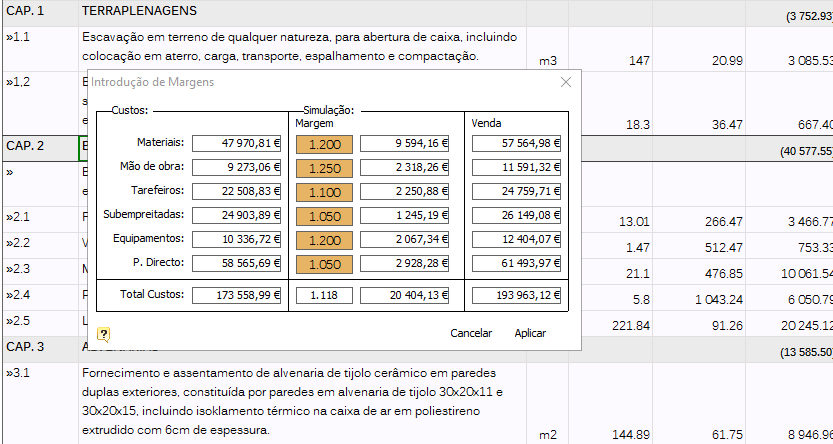
You can also introduce margins by chapter, assigning each chapter of the price list a different margin.
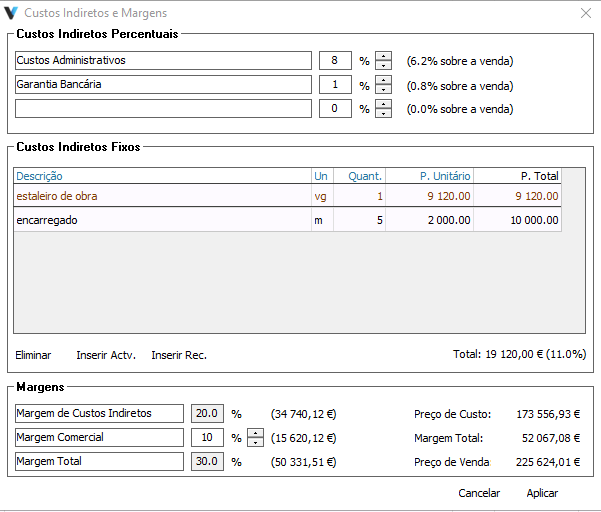
Visualorc also allows the introduction of margins through the calculation of indirect costs, determining percentage costs, such as administrative costs, commissions or guarantees, fixed indirect costs, such as construction site costs not included in the estimate, and the introduction of a profit margin .
At any time, you can view the detailed estimate results, cost structure and margins in the "Properties" window of your estimate.
Set Final Price
Start from the sale price you want to reach, instead of deducing it from margins. In the differential margins, chapter margins and indirect costs windows, use the "Set Final Price" option to indicate the total amount you want for the estimate; each item's margins or percentages are automatically adjusted, proportionally, to reach it.
The requested price must be between 0.6 and 20 times the estimate's cost, with a warning otherwise. Any cent difference resulting from rounding is settled on the last items, through a direct price of the "Rounding" type when needed.