Prepare the work plan
Obtain planning tasks automatically from estimate chapters and sub-chapters. If you want more detail in the plan, you can add new sub-tasks to each task.
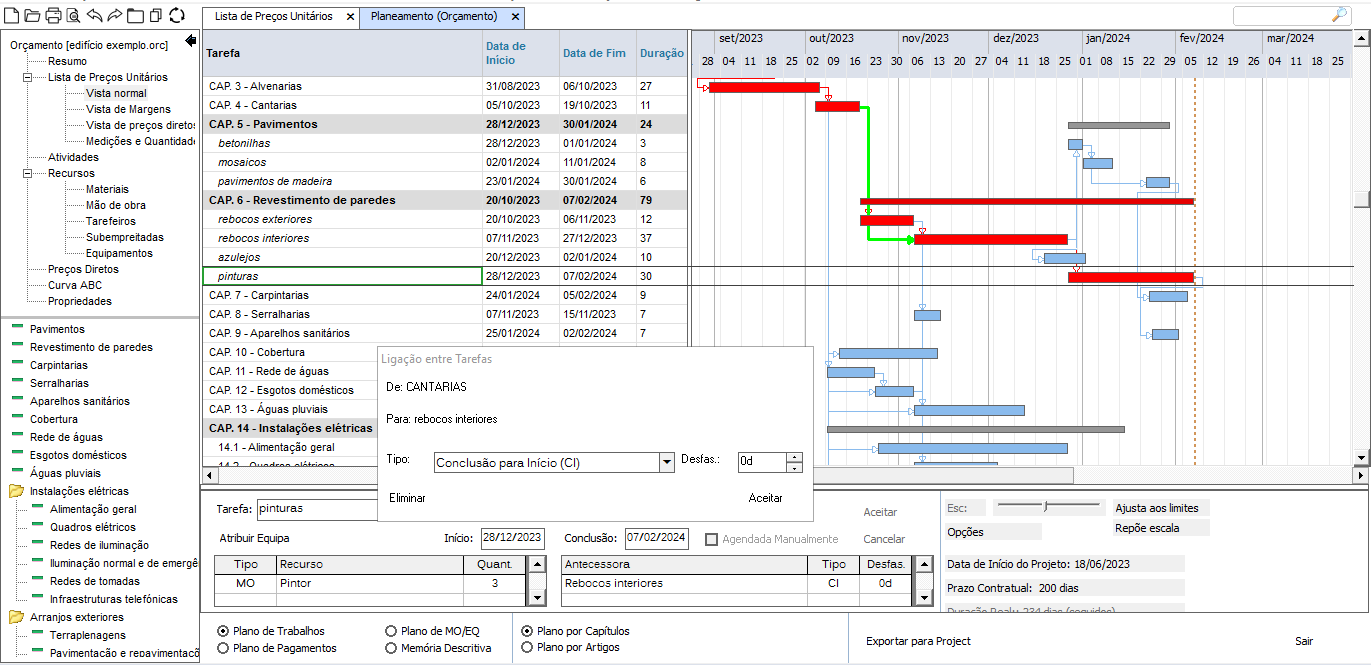
Additionally, you can also associate all the items in the unit price list with the planning, using the 'Plan by Items' functionality.
Assign each task its duration, and locate tasks in time by dragging the Gantt chart bars or applying precedence links between the various tasks. Visualorc automatically determines the plan's critical path using the Pert-CPM method.
Use the various options available to print the precedences, work quantities and yields of each task, along with your planning.
During the estimating phase, preparing the work program is quite easy and intuitive, freeing the estimator for other estimate tasks. The labor, equipment, financial schedule and descriptive memory plans are generated automatically, substantially reducing the time spent on these tasks.
Automatic Plan
Generate the complete work plan in a single step, instead of building it task by task. In "Automatic Plan," enter the project deadline, in months or consecutive days, and whether you want labor and equipment resources assigned automatically — per chapter or shared across all items — with a limit on how many workers can be on site at the same time.
Visualorc classifies each task into a typical construction phase, links the phases in their usual sequence with the appropriate overlaps, and adjusts durations so the last task finishes within the given deadline. The descriptive memory for tasks with no text is filled in automatically from the database.
The system learns from the company's previous plans — durations, links, resources and texts — making each new automatic plan more accurate. At the end, a summary is shown with the option to keep the generated plan or revert to the previous one; when regenerating the plan again, you can choose to keep the manual changes made since the last time.